Finding the right musician without leaving LiveTonight

Designing an artist-to-artist collaboration flow inside an existing booking platform.
Role
Product Designer · Personal project
Scope
Interactive prototype · User testing in progress
Duration
2-week sprint
Category
Mobile
About the project
I challenged myself to take an app I use regularly and design a new feature around a problem I had experienced first-hand with the goal of making it useful beyond my own case.
As a singer using LiveTonight, I often rely on the platform to manage gigs, productions and my band. But when a musician is unavailable, finding a suitable replacement still happens outside the product.
🎶
20K+
Events organized since 2016
🥇
Curated network
Artists selected through auditions
📅
Since 2016
Supporting independant artists
⚡️
<24h
Custom artist selection turnaroud
01 ———— Discovery
Understanding the product
LiveTonight is a two-sided booking platform connecting event organizers with professional musicians and DJs.
On the client side, users can search, filter and compare artists before requesting a quote. On the artist side, the mobile app is mainly an operational tool for managing bookings, productions, availability and group members.
The gap
Clients can explore LiveTonight’s artist network — artists cannot easily explore that same network themselves.

search
filter
compare
contact
book
Client side: discover & book

manage bookings
create productions
update availability
manage line-up
track messages
Artist side: manage & operate
THE GAP
Clients can explore the artist network.
Artists mainly manage their own activity.
Missing link: artist-to-artist discovery
02 ———— Framing the problem
Was this only my problem?
The idea started from a situation I had experienced myself: receiving an interesting booking request, but being unable to confirm the requested line-up because one of my usual musicians was unavailable.
Before designing anything, I wanted to understand whether this was only my own frustration.
User research
I spoke informally with 4 singers and musicians using the platform about what they do when someone in their usual line-up is unavailable.
PARTICIPANTS
INSIGHT #1
4 Livetonight
singers and musicians
use signals
Independent performers using the platform to manage gigs and productions.
use ●○○○○ Occasional users
Research goals
☐ Current workflow
How do artists currently find a replacement when a musician is unavailable?
☐ Selection criteria
What information matters most before reaching out to someone new?
☐ Trust and confidence
What makes artists feel comfortable working with a musician they have never played with before?
☐ Main frictions
What makes finding and confirming a replacement difficult today?
What I learned
Interviews confirmed some of our assumptions while challenging others.
Three consistent patterns emerged:
INSIGHT #1
use signals
3/4
want to check availability first
use signals
→ avoid contacting unavailable musicians
→ date is a hard constraint
→ availability needs to be visible early
use signals
“Before looking at the profile, I first need to know if they’re actually free.”

Emmy
INSIGHT #2
INSIGHT #1
3/4
need musical fit, not just the right instrument
use signals
→ genre strongly affects compatibility
→ musicians are not interchangeable
→ repertoire and playing style matter
use signals
“A guitarist can be great, but if they don’t play the right style, it won’t work.”

Esther
INSIGHT #3
INSIGHT #1
X/4
rely on trust signals before contacting someone new
use signals
→ previous experience matters
→ videos help assess level and style
→ professional profiles reduce uncertainty
use signals
"If I’ve never played with them before, I need to see what they do before reaching out."

Ben
DESIGN GOAL #1
INSIGHT #1
Make availability visible upfront
use signals
✓ Filter by booking date first
✓ Surface only relevant profiles
✓ Avoid unnecessary outreach
DESIGN GOAL #2
INSIGHT #1
Prioritise musical compatibility
use signals
✓ Combine instrument + genre
✓ Make profile media easy to review
✓ Explore repertoire matching later
DESIGN GOAL #3
INSIGHT #1
Reduce the risk of working with someone new
use signals
✓ Reuse LiveTonight’s curated profiles
✓ Surface videos and experience
✓ Keep key profile information accessible before contact
02 ———— Reframing
Shift in perpective
The challenge wasn't simplifying the workflow. It was reducing the mental effort required to complete it.
This reframing became the foundation for every design decision that followed.
INITIAL SPRINT BRIEF
How might we simplify the expense reporting journey from payment to reimbursement?
REFRAMED PROBLEM STATEMENT
How might we reduce employees' cognitive load throughout the expense reporting journey?
03 ———— Ideation
Exploring interaction patterns
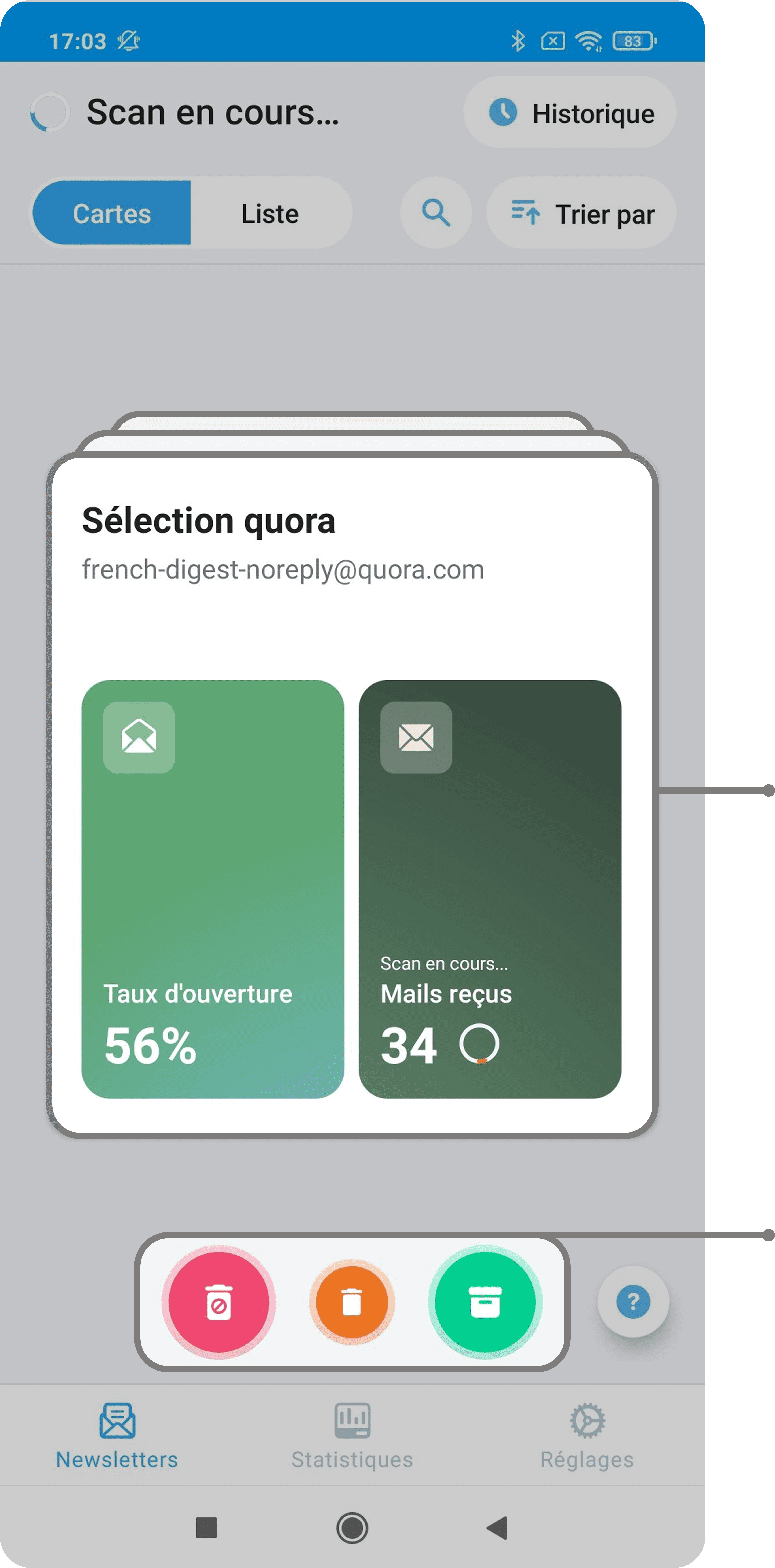
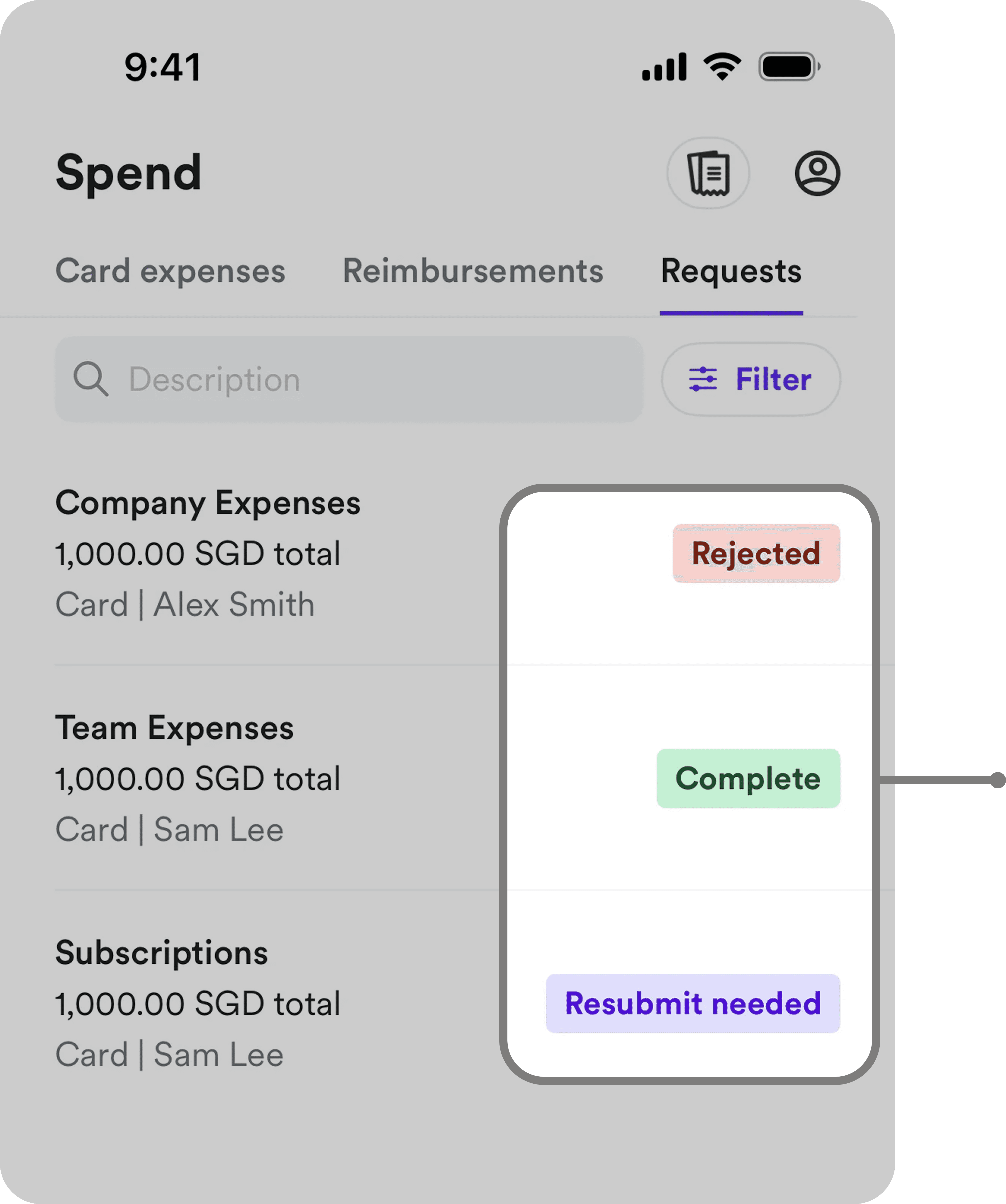
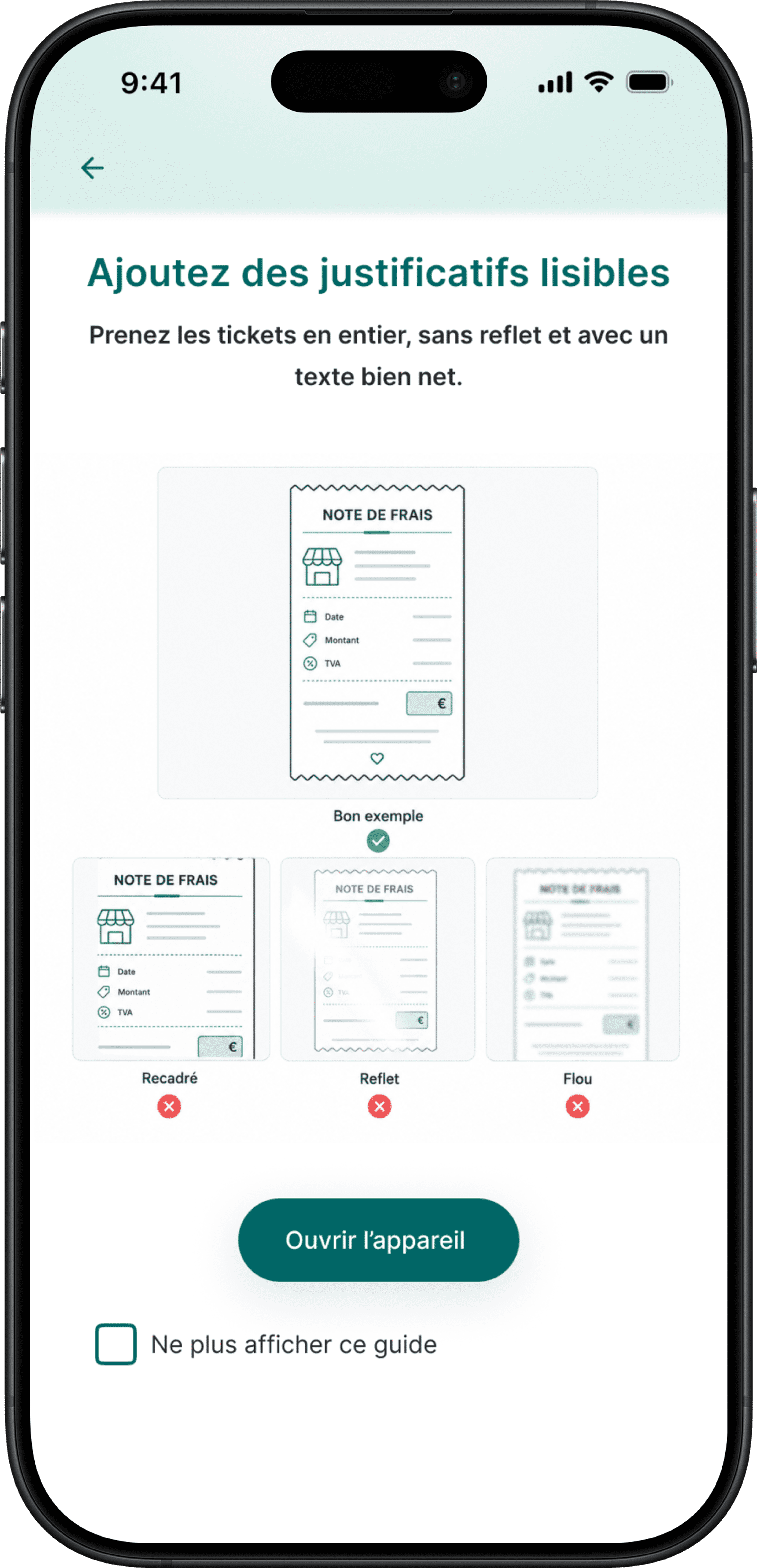
We started with divergent ideation to explore multiple concepts without constraints. Once a promising direction emerged, we looked beyond expense management tools to identify familiar interaction patterns that could strengthen the experience.

progress overview
limit indicators
Bankin'

stacked cards
swipe actions
Cleanfox
progress overview
visual spending limits
Bankin'
stacked cards
swipe actions
Bankin'
Jumio

IOS

capture guidance
smart autofill
batch capture
status indicators
Camscanner

Airwallex
Pattern exploration
These patterns shaped the first version of our product concepts.
04 ———— V1
Designing the first experience
Our first concept translated the design goals into three design responses, each addressing a different source of cognitive load identified during research.
DESIGN RESPONSE #1
Make reimbursement predictable
Make reimbursement rules, progress and next steps visible throughout the journey.


DESIGN RESPONSE #2
Let the system do the work
Let the system extract and pre-fill information, so users only review what requires their attention.


DESIGN RESPONSE #3
Reduce repetitive work
Reduce repetitive actions by enabling batch capture and submission.


05 ———— User testing
User testing
We tested our first concept with five participants to understand:
🟢 what reduced cognitive load
🟠 what still created friction
INSIGHT #1
use signals
Batch workflow reduced repetitive work
use signals
🟢 4/4 appreciated processing multiple expenses in a single workflow.
🟠 2/4 discovered batch capture without assistance.
use signals
"Being able to scan several receipts at once is a real time saver."
INSIGHT #2
use signals
Reimbursement visibility made the process predictable
use signals
🟢 4/4 appreciated seeing reimbursement status at a glance.
🟠 3/4 found some labels ambiguous.
use signals
"You immediately know where it's blocked and what takes time."
INSIGHT #3
use signals
Exception-based review reduced manual work
use signals
🟢 4/4 appreciated an exception-based workflow, where only uncertain information required manual review.
🟠 3/4 wanted to understand why some fields required their attention.
use signals
"You simply swipe to validate—it's much faster."
06 ———— V2
Iterating the experience
07 ———— Personal refinement
Taking the concept further
The sprint ended with V2. I then independently pushed the concept further to explore how it could scale.
PERSONAL REFINEMENT #1
Separate tracking from organisation
I separated reimbursement tracking from expense organisation to reduce competing information and give each view a clear purpose.
V2

Personal


PERSONAL REFINEMENT #2
From individual cards to a scalable overview
I revisited the information architecture to preserve reimbursement visibility as the number of expenses grows.
V2

reimbursement visibility improved, but the overview remains amount-focused
detailed progress cards work for a few expenses, but don't scale well
Personal

expenses are grouped by status for an at-a-glance overview
search and filters make larger volumes manageable
required actions stand out without opening each expense
PERSONAL REFINEMENT #3
Bring required actions to the user
I extended notifications beyond status updates to surface issues that require user attention.
V2

notifications only communicate status updates
Personal

notifications evolved from passive status updates to actionable alerts
PERSONAL REFINEMENT #4
Let the workflow adapt to user behaviour
Instead of asking users to choose a capture mode, the flow automatically adapts when multiple receipts are captured.
V2

V1
users must choose a capture mode upfront
Personal

a second capture automatically creates a batch
contextual feedback "Ready for the next scan" encourages users to keep scanning
08 ———— Final experience
Final prototype
This final prototype combines the team’s iterations and my personal refinements into a complete end-to-end flow.
09 ———— Success metrics
KPIs
As the concept wasn't shipped, these metrics define how I would evaluate whether the experience actually reduces the burden of expense reporting.
↓ TIME TO SUBMIT
Median time from receipt capture to expense submission.
↓ MANUAL CORRECTION RATE
% of automatically pre-filled expenses requiring user correction.
↓ EXPENSES RETURNED BY FINANCE
% of submitted expenses requiring correction or additional information (Baseline: 30% → Success = decrease)
↑ REIMBURSEMENT UNDERSTANDING
% of users who correctly understand reimbursement limits, current status and next steps.
10 ———— Going further
Next opportunities
The employee experience is only one part of the reimbursement journey. I identified three opportunities to further reduce manual work and extend the experience across the wider workflow.
Next opportunities
🔄
Design the other side of the workflow
Explore manager and Finance workflows to improve approvals, exception handling and communication.
📅
Connect expenses to work context
Use calendar and business-trip context to suggest projects and clients automatically.
🔔
Make required actions proactive
Extend in-app alerts to contextual push notifications when an expense requires attention.
Reflection
AUTOMATION ISN'T ENOUGH
Reducing cognitive load wasn't only about automating tasks. It also meant reducing decisions and directing attention to what actually required user input.
VISIBILITY NEEDS STRUCTURE
Making more information visible doesn't necessarily make a process clearer. Hierarchy and progressive disclosure became essential as the experience grew.
DESIGN BEYOND THE HAPPY PATH
Designing for errors, uncertainty and required actions proved as important as designing the ideal submission flow.

